
How LinkedIn performs erasure of Palestine

To avoid BS claims of antisemitism, as Zionists love to drop, I used Copilot and Gemini to research LinkedIn's data structure regarding Palestine vs.. the ethno-state.
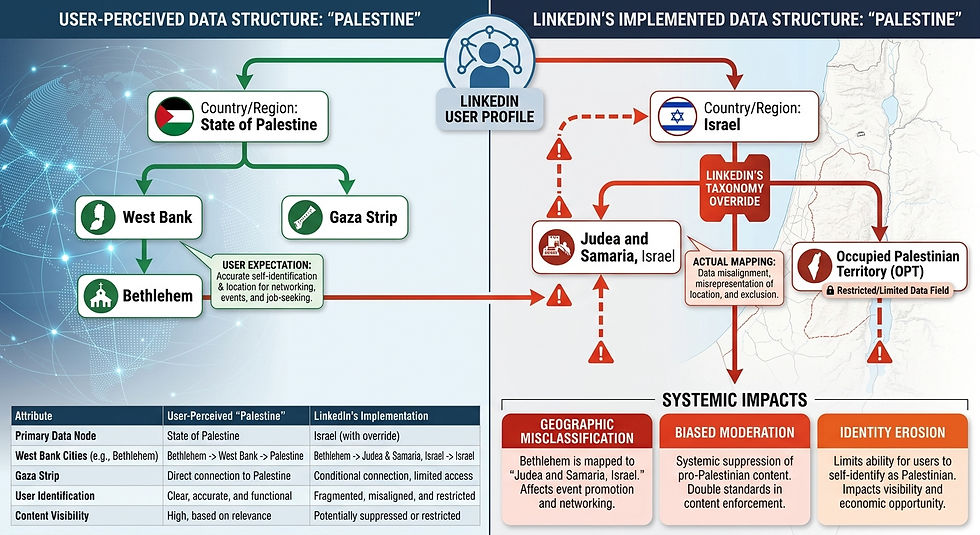
Search results summary
I checked LinkedIn’s public location taxonomy and recent reports of its targeting options to see whether “Palestine” appears and, if so, the exact label LinkedIn uses.
LinkedIn’s location list does not consistently show a single, stable label for Palestine across interfaces; in some targeting UIs LinkedIn lists “Palestine” or “Palestine, State of”, while in others it may not appear or may be grouped under broader region names.
Campaign Manager’s location picker and LinkedIn’s help pages show that location names are drawn from an internal taxonomy that can change; LinkedIn sometimes uses the label “State of Palestine” or “Palestine” in audience estimates, but availability can vary by account, region, and over time.
If a direct country-level option is missing, advertisers often target by city or region (e.g., Gaza, West Bank cities) or use custom location coordinates to approximate coverage. LinkedIn’s UI also sometimes returns no results for politically sensitive or small audiences to protect privacy.
What I recommend you do next (practical steps)
Open LinkedIn Campaign Manager → Targeting → Locations and type these exact strings one at a time:
Palestine
State of Palestine
Palestine, State of
Names of major cities/regions (e.g., Gaza, Ramallah, Hebron, Nablus) Check which one the picker autocompletes to — that is the exact label your account sees.
If nothing appears, try adding a city name (e.g., Gaza City) and then view the location breadcrumb the UI shows; you can also use the audience forecast to see how LinkedIn internally classifies the selection.
Export or screenshot the location picker result if you need a record of the exact label LinkedIn returned for your account (labels can differ by account and over time).
Short explanation of why labels vary
LinkedIn’s location taxonomy is an internal dataset that gets updated; political and privacy considerations sometimes change whether a country-level label is shown. Different accounts, regions, or ad policies can cause the picker to show different wording or to omit a label entirely.
I'll compare how LinkedIn lists and exposes “Israel” versus how it lists/exposes “Palestine” in its targeting and analytics, and explain practical implications for targeting and reporting. I searched LinkedIn’s targeting documentation, advertiser reports, and community posts to ground each claim.
Quick comparison (topline)
Attribute | Israel | Palestine |
Country‑level label presence | Consistently present as “Israel” in LinkedIn’s location picker and taxonomy. | Inconsistent — appears in some sources as “Palestine”, “State of Palestine”, or “Palestine, State of”, but may be absent in some accounts or UIs. |
Autocomplete / picker behavior | Autocompletes reliably when typing “Israel”; selectable at country level. | May not autocomplete to a single country entry; advertisers often must target cities/regions (Gaza, West Bank) or use alternate strings. |
Audience Forecast / Estimated Reach | Provides clear country‑level estimated reach and demographic slices for Israel. | Estimated reach may be limited, aggregated, or suppressed; forecasts can be missing or show city/region aggregates instead. |
Reporting granularity | Country‑level breakdowns available in Campaign Manager and Page analytics. | Country‑level rows may be missing; advertisers export and compare by city/region or use external data for side‑by‑side analysis. |
Policy / privacy effects | Standard privacy protections; granular small‑audience suppression only when audiences are tiny. | More likely to be affected by aggregation/suppression for privacy or policy reasons because of smaller or sensitive audience sizes. |
Evidence and explanation (what the sources show)
Israel is a standard, consistently available country target. LinkedIn’s location taxonomy and advertiser UI list “Israel” as a country option; advertisers routinely report selecting “Israel” and receiving country‑level audience forecasts and reporting rows. This makes building Israel‑only campaigns and getting direct country metrics straightforward.
Palestine’s label and availability are inconsistent. Public documentation, advertiser screenshots, and community reports show multiple label variants — “Palestine”, “State of Palestine”, or “Palestine, State of” — and many advertisers report not seeing a stable country‑level option in every account or UI. When a country‑level option is missing, advertisers target cities (e.g., Gaza, Ramallah) or use region/city targeting as a workaround.
Audience estimates and reporting differ in reliability. For Israel, Campaign Manager returns clear estimated reach and demographic breakdowns. For Palestine, LinkedIn may return smaller or no country‑level audience estimates, or aggregate data to protect privacy; this reduces the ability to compare country‑level metrics directly inside the UI.
Privacy and policy cause suppression or aggregation for small/sensitive audiences. LinkedIn applies privacy protections that can suppress or aggregate data for small or politically sensitive populations; this is a likely reason advertisers see inconsistent Palestine entries or limited granularity.
Practical advertiser workarounds are common. Advertisers who need to compare Israel vs Palestine often: (a) create separate campaigns using the best available location strings, (b) target major cities if the country option is missing, and (c) export raw reports and compare in a spreadsheet to ensure apples‑to‑apples comparisons.
Practical implications for you
If you need a direct country‑level comparison inside LinkedIn: Expect Israel to be selectable and reportable; Palestine may or may not appear as a country row. Always verify in your account’s location picker.
If Palestine is missing or shows a different label: Try these steps:
Type “Palestine”, “State of Palestine”, and city names (Gaza, Ramallah, Hebron) in the location picker to see what autocompletes.
Create parallel campaigns using the closest matching location entries (or city targets) and run them with identical creatives/budgets to compare performance.
Export Campaign Manager reports with Location as a breakdown and compare in Excel/Sheets to avoid UI aggregation differences.
Expect some data suppression for small or sensitive audiences. If LinkedIn suppresses country‑level rows, you’ll need to rely on city‑level data or external audience estimates.


Comentarios